



Guide to Pre-Arrival Declaration at Tan Son Nhat Airport
Every day, tens of thousands of international passengers land at Tan Son Nhat Airport, the largest aviation gateway in southern Vietnam. Congestion at the immigration control area during peak hours is a familiar headache for many travelers. To completely resolve this issue and modernize the clearance process, the Vietnam Immigration Department has officially implemented mandatory electronic pre-arrival information declaration starting from April 15, 2026.
This article provides the most complete step-by-step guide, covering who must declare, how to fill in the information, and practical tips to help you clear immigration as quickly as possible.
New Regulation on Pre-Arrival Declaration at Tan Son Nhat Airport
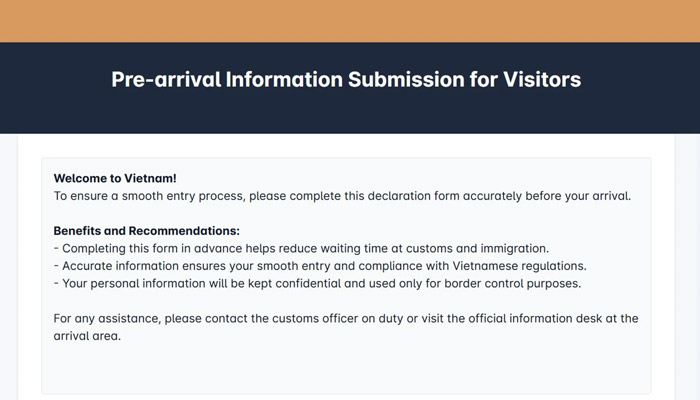
From April 15, 2026, all foreign passengers and overseas Vietnamese using visas arriving at Tan Son Nhat Airport are required to complete an online personal information declaration before proceeding to immigration. Once the declaration is successfully submitted, the system will issue a personal QR code confirmation. Passengers must present this QR code to the Border Guard officers at the immigration counter. If you have not declared in advance, you may be held for manual processing, which can seriously affect your schedule.
- Legal Basis: Official Dispatch No. 1474/CACK TSN – Vietnam Immigration Department
- Effective Date: April 15, 2026
- Scope of Application: Tan Son Nhat International Airport (TSN) – Ho Chi Minh City
- Procedure: Online declaration → Receive QR code → Present at immigration
Many major international airlines such as Vietjet, Korean Air, Singapore Airlines, and others have already proactively sent reminders to passengers during online check-in or via booking confirmation emails. This shows that the regulation is being implemented seriously and in coordination across multiple parties.
Who Must Declare Before Entering Tan Son Nhat Airport
| Passenger Category | Mandatory Declaration? |
|---|---|
| Foreign nationals | ✅ MANDATORY |
| Overseas Vietnamese using a visa to enter Vietnam | ✅ MANDATORY |
| Vietnamese citizens (Vietnamese passport) | ❌ Not applicable |
| Transit passengers (not clearing domestic immigration) | ❌ Not applicable |
Step-by-Step Guide to Online Pre-Arrival Declaration at Tan Son Nhat
Below is a detailed guide to completing the Pre-arrival Information form on the official website of the Vietnam Immigration Department.
Step 1: Access the System
- Visit: https://prearrival.immigration.gov.vn/
- On the homepage, click the blue button “Create & Submit Pre-arrival Information” (or “Tạo và nộp tờ khai” if using Vietnamese).
- Enter the CAPTCHA (image or letters).
- Select your nationality from the dropdown list.
Note: The website supports both Vietnamese and English. It is recommended to declare 1–3 days in advance (no later than before your flight).
Step 2: Fill in Personal Information (Passenger Information) This section is on the first page of the form (tab 1/4). Required fields (marked with a red *):
- Expected Arrival Date: Select your arrival date in Vietnam (DD/MM/YYYY, GMT+7 timezone).
- Full Name: Write in ALL CAPITAL LETTERS, NO DIACRITICS, exactly as in your passport (e.g., NGUYEN VAN A).
- Date of Birth: DD/MM/YYYY.
- Gender: Male / Female / Other.
- Nationality: Select from the list.
- Country Code + Phone Number: e.g., +84 for Vietnam or your country code.
- Email Address: Enter your Gmail or personal email (used for confirmation if needed).
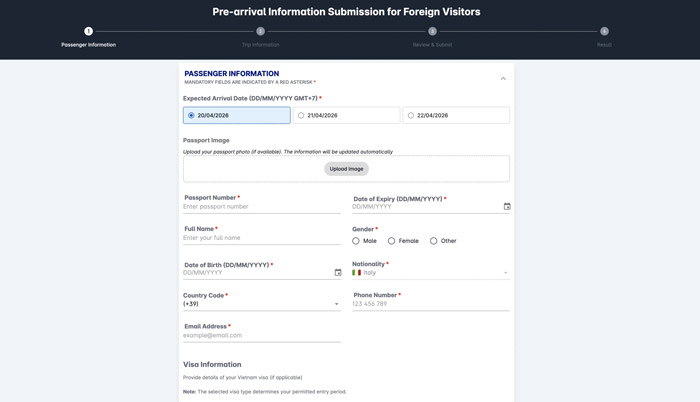
Note: All information must match your passport 100%. Even a single incorrect letter may require you to redo the declaration.
Step 3: Upload Passport Photo (Passport Image) On the same Passenger Information page:
- Find the Passport Image section.
- Click “Upload Image”.
- Upload a clear photo of your passport’s bio page (JPG/PNG, under 2MB).
- The system will automatically read and fill in the data (passport number, issue date, expiry date, name, etc.).
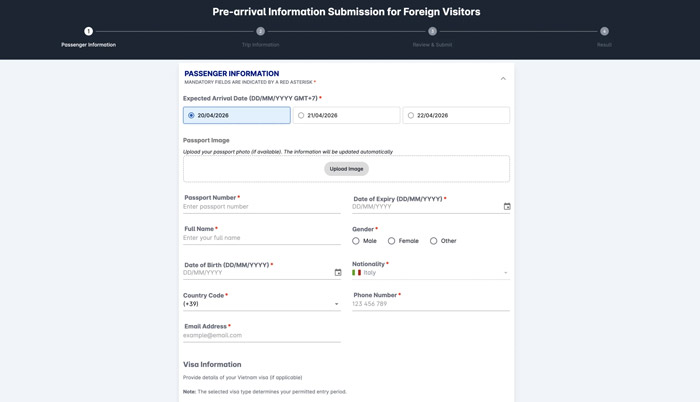
Note: The image must be sharp and not blurred or obstructed. If the system reads incorrectly, you can correct it manually in the next step.
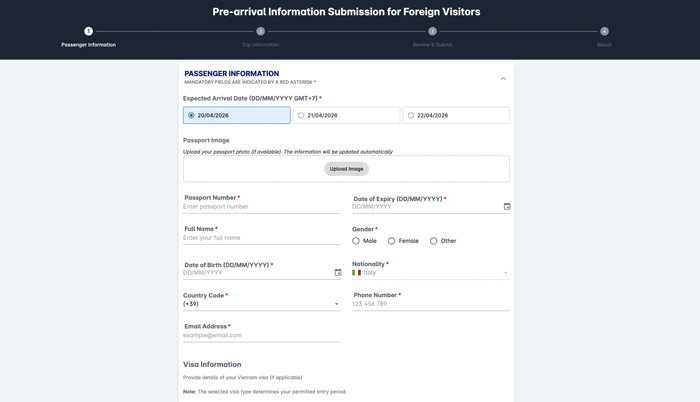
Step 4: Enter / Verify Passport Information After uploading, the following fields will auto-populate or can be entered manually:
- Passport Number
- Date of Expiry (DD/MM/YYYY)
- (Issue date is often auto-filled or not mandatory)
Double-check everything carefully before continuing.
Step 5: Declare Visa / Purpose of Entry (Visa Information) Right below the personal information:
- Select visa type or purpose: Tourism (Tourist), Visiting relatives, Business, etc.
- If you have a visa/e-visa: Enter visa number, issue date, and expiry date.
- If visa-exempt:
- Enter “0” or “N/A” for visa number.
- Issue date = arrival date.
- Expiry date = planned departure date from Vietnam.
- Place of issue: “Visa exemption” or “Miễn thị thực”.
Note: Choosing the wrong visa type may affect your permitted length of stay.
Step 6: Trip Information Switch to tab 2 (Trip Information):
- Flight Number: e.g., VN123 or QR456.
- Arrival Airport: Select Tan Son Nhat (SGN).
- Accommodation Address in Vietnam: Enter the full address (house number, street, district/ward, Ho Chi Minh City or other province). Do not use vague entries like “Hotel ABC”.
Note: This is a key section for customs and immigration verification.
Step 7: Review & Submit Switch to tab 3:
- Tick the box “I have read and understood…” (confirming information accuracy).
- Review all details (use the “Edit” button if needed).
- Click “Submit”.
Step 8: Save Your Declaration Code (Result) After successful submission:
- The system will display your Declaration Code.
- Take a screenshot or save the code immediately (for lookup, editing, or presentation at the airport).
- You can also print or save the PDF.
General Important Notes:
- You can declare on behalf of family or friends (each person needs a separate declaration).
- Declare 1–3 days in advance; avoid doing it too close to departure.
- Information must match your passport and visa/e-visa 100%. Even minor errors require re-submission.
- The Pre-arrival declaration is completely separate from the temporary residence declaration.
- If you encounter errors: Use the “Lookup & Update Declaration” button on the homepage to search and edit.
You’re done! When you arrive at Tan Son Nhat, simply present your declaration code (on your phone) at the immigration counter if requested. Safe travels and smooth entry!
⚠️ At the international terminal of Tan Son Nhat Airport, many QR codes are posted that link directly to https://prearrival.immigration.gov.vn/. You can scan and complete the declaration on the spot and receive the QR code on your phone. However, do not wait until you are at the airport. During peak hours (early mornings, late afternoons on weekends and holidays), the immigration area is extremely crowded. Declaring on-site will cause further congestion and may add 30–60 minutes to your wait.
📋 Information You Need to Prepare
| # | Group of Information | Details to Fill In |
|---|---|---|
| 1 | Personal Information | Full name (as in passport), date of birth, nationality, gender |
| 2 | Travel Document | Passport number, issue date, expiry date, place of issue |
| 3 | Visa Information | Visa type (e-visa, visa on arrival, etc.), visa number, expiry date |
| 4 | Flight Information | Flight number, airline, scheduled arrival date/time |
| 5 | Accommodation in Vietnam | Name of hotel / full address of first stay in Vietnam |
Once you have your QR code confirmation, the entry process follows this flow:
- Step 1: Aircraft lands at Tan Son Nhat – Proceed to Terminal 2 (International).
- Step 2: Follow signs to the Immigration Control area.
- Step 3: Prepare: Passport + Visa + QR code on your phone (or printed copy).
- Step 4: At the counter: Border Guard officer scans your QR code → Verifies information → Checks passport & visa.
- Step 5: Entry stamp (or electronic confirmation) is issued → Immigration cleared.
- Step 6: Proceed to baggage claim according to your flight number.
- Step 7: Customs: Green Channel (nothing to declare) or Red Channel (goods to declare).
- Step 8: Exit to the International Arrivals Hall T2 – All procedures completed!
💡 Handy Tips:
- Take a screenshot of your QR code and save it to your photo library before boarding — in case your phone runs out of battery or loses signal upon landing.
- Print a paper copy of the QR code if traveling with young children or elderly passengers who do not use smartphones.
- If eligible for Autogate (foreigners with registered temporary/permanent residence cards), the process takes less than 1 minute.
- Carrying more than USD 5,000 (or equivalent) must be declared at Customs — use the Red Channel.
Special Note for Dual or Multiple Citizens: Passengers holding two or more passports must declare using the exact passport they are presenting for entry into Vietnam. The information on the QR code must match the passport shown at immigration 100%.
FAQ – Frequently Asked Questions
Q1: How far in advance should I declare before my flight?
👉 Declare within 24–72 hours before your scheduled landing time. The best time is right after online check-in so you have time to fix any errors.
Q2: If I forget to declare, will I be denied entry?
👉 Not necessarily denied, but you will be held for manual processing. During peak hours, this can add 30–60 minutes, affecting your onward connections.
Q3: What if I am an overseas Vietnamese with a Vietnamese passport but entering with a visa?
👉 Mandatory declaration. The rule is based on the entry method (using a visa), not nationality or passport type.
Q4: Is there a fee for declaration?
👉 Completely free. This is the official portal operated by the Vietnam Immigration Department at prearrival.immigration.gov.vn.
Q5: Does this regulation apply at Noi Bai Airport or other border gates?
👉 According to Official Dispatch No. 1474/CACK TSN, it currently applies only at Tan Son Nhat Airport. Monitor official announcements from the Vietnam Immigration Department for updates on other gates.
Q6: What happens if my declaration information does not match my passport?
👉 The Border Guard officer will detect the mismatch during verification. You will be asked to re-declare on the spot and may face additional checks. Always ensure information is entered exactly as it appears in your passport.
Pre-arrival declaration is not a new trend. Many leading tourism and immigration countries have implemented similar systems with excellent results, such as Japan’s Visit Japan Web, Korea’s K-ETA, the USA’s STA & APC kiosks, and Singapore’s SG Arrival Card.
The rollout at Tan Son Nhat demonstrates Vietnam’s strong commitment to improving the entry experience, enhancing tourism competitiveness, and strengthening border security amid the sharp growth in international arrivals in 2026.